
Deal stage automation is a decision, not a trigger
By Marco Serafini · · Automation Pattern
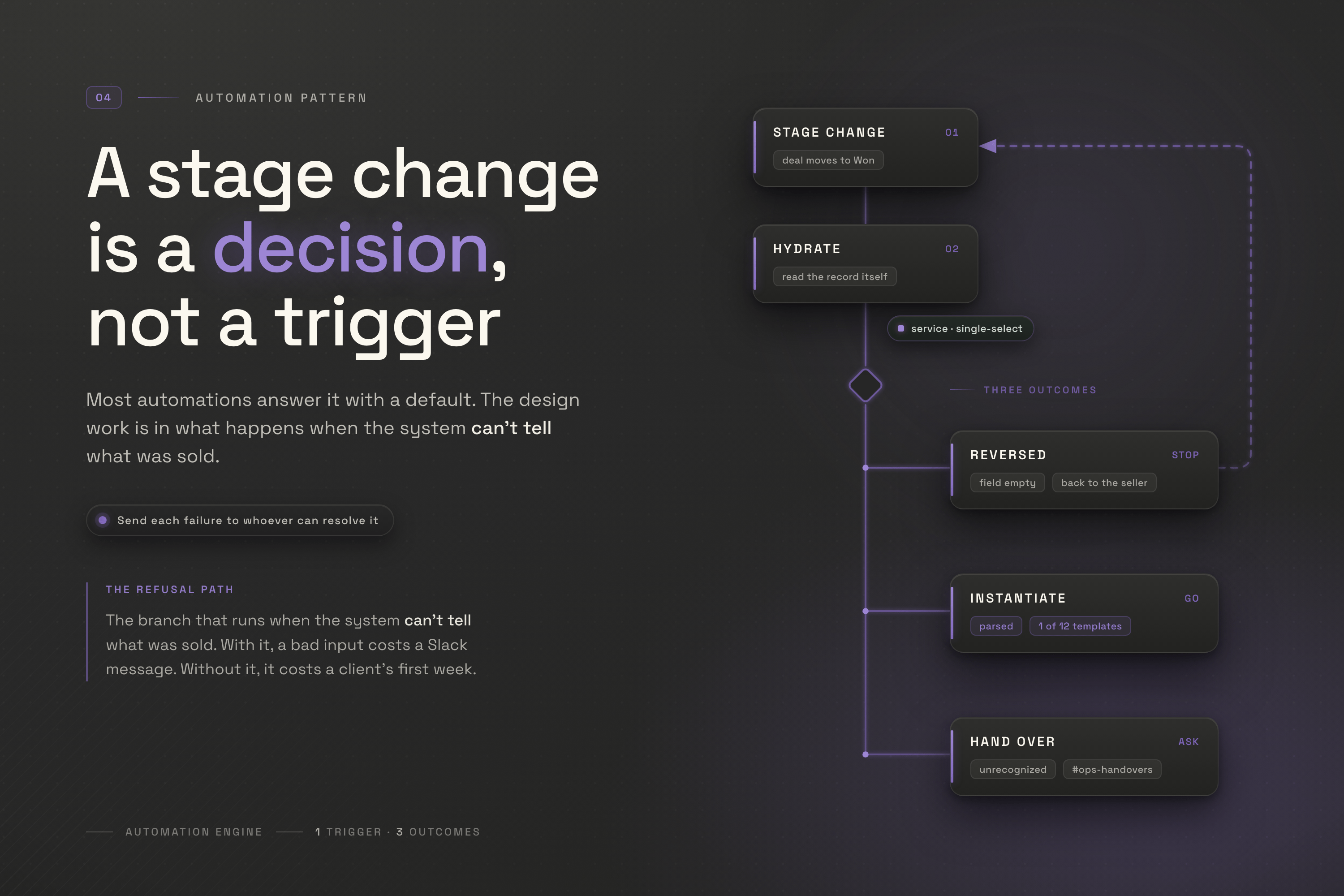
A deal moves to Won. Behind the CRM, a workflow wakes up and builds whatever comes next: a project, a folder, an onboarding sequence, a task for whoever owns delivery. Most days it works.
The design question is what it does on the day it can’t tell what was actually sold.
Most deal stage automation answers that question by guessing, because nobody ever asked it. The trigger fires, the workflow runs the only path it knows, and a new client spends their first week inside a project structure built for a different engagement. Nothing errors. Nothing alerts. The automation did exactly what it was told, on a premise that had quietly stopped being true.
This is a walk through the other design: a stage change that carries a decision, a system that hydrates its own context before it acts, and two guards whose job is to stop when it doesn’t know. I’ll use Novrith’s own workflow as the worked example, the path from a closed deal to a delivery project, because it’s the one whose failures I’ve had to sit with. The tools are Attio, n8n, and ClickUp. The pattern is the point; those are just where you can watch it run.
The trigger tells you almost nothing
A stage change is worth building on for one reason: it is the only moment when everyone downstream agrees something is true. That agreement is also the whole of what it carries. Call it a stage-triggered side effect: an automation that runs off a state change rather than a form submission or a schedule.
The mistake is treating that moment as an instruction. It isn’t. It’s a notification that an instruction might exist.
Our webhook payload is deliberately thin. Attio fires POST /webhook/attio-deal-won and sends exactly one field: { record_id }. Not the deal name, not the company, not the amount, not what was sold. One identifier.
That looks like an oversight and it’s the opposite. A stage-change payload is whatever the CRM happened to be holding at the microsecond the stage flipped, shaped by a mapping someone configured months ago. The workflow throws it away and reads the record itself: fetch the deal from Attio, follow the relationship to the company, build its own picture from the source of truth.
Two API calls before any logic runs, a few hundred milliseconds. What you buy is a workflow that knows what the deal says now, not what the webhook mapping said the last time someone touched it.
The logic is reading what was sold
Once the deal is hydrated, the automation has to answer one question before it can build anything: which structure does this engagement need?
At Novrith that answer lives in a single-select field on the deal called service, whose options encode three things at once. Revenue Engine - Scale. Support Add-On - Priority. Operations Engine - Strategic Sessions - 5-Hour Package. Engine, offering, and tier, compressed into one option title a salesperson picks once, at the moment they know the answer.
The workflow parses that title back into its three parts and branches on the offering, because the offering is what determines the shape of the thing being built:
Core Implementation always creates a new list, instantiated from one of twelve engine-and-tier templates. Four engines, three tiers, and the template carries the milestone structure and the standard deliverables so no two engagements of the same type start differently.
Automation-as-a-Service reuses an existing list if the client already has one, because these arrive repeatedly and shouldn’t fragment into a new container each time.
Strategic Sessions reuses or creates, then adds a milestone named for the year and the package size, since the unit being tracked is hours against a commitment, not a scope.
Support Add-On does the same on a monthly rhythm, with the hour allocation derived from the tier.
The difference isn’t cosmetic. Pick the wrong path and you get a container that can’t hold the engagement: hours tracked against a scope that has no hours, milestones on a retainer with no phases, a fixed-scope template around work that recurs.
Which is why the design work isn’t in those four paths. It’s in what happens when none of them apply.
The two ways it refuses to guess
Two reasons the system might not know which structure to build, and they deserve different answers, because a different person can fix each one.
The field is empty. Someone moved the deal to Won without recording what was sold. The person who can fix that still has their hand on the mouse, so the failure never travels: the stage change is reversed, the deal goes back where it came from, and a popup tells them what’s missing. No queue, no handover, no automation run at all. The deal isn’t Won until the record can say what Won means, and the correction costs five seconds because it happens in context.
The field holds a value the parser can’t place. Nobody at the point of entry did anything wrong. The value is real; it’s the automation’s model of the business that has gone stale. There’s nobody to send it back to. So the workflow does not fall back to a default. It does not pick the most common template. It posts to an internal Slack channel, #ops-handovers, names the deal, says plainly that it could not determine what was sold, and stops.
That split is the whole design. Send a failure to whoever can actually resolve it: the salesperson, immediately, in the screen they’re already looking at, or the operator, asynchronously, with the context preserved. A system that routes both to the same Slack channel has made the easy failure as expensive as the hard one.
One detail in the second path is worth stealing. Before it gives up, it still creates the client folder.
That’s a deliberate asymmetry. The folder is identical regardless of what was sold, so building it costs nothing even if the guess would have been wrong. The list encodes the decision, so it waits for a human. Whoever opens Slack ten minutes later starts from a half-built structure that’s correct as far as it goes, and makes the one call the machine couldn’t.
The general form: when an automation can’t complete, it should finish the part that isn’t contingent on the thing it doesn’t know, and hand over the part that is.
The handover path is also the one everybody cuts. It handles a case that almost never fires, it’s the least satisfying thing to build, and a demo runs perfectly without it. Build it anyway, and not out of caution: every other branch in this workflow assumes the parser is right about the business, and the parser is a list of option titles I typed out once. The handover path is the only branch that doesn’t take my own model as given.
The output is a structure, not a record
When the parse resolves cleanly, what gets created is not “a project”. It’s a specific arrangement that a person would otherwise have to assemble from memory:
The ClickUp client folder, created from a template if it doesn’t exist and reused if it does. The project list, named company first and then engine and tier, so whatever a client buys later lands next to what they bought first. A milestone task typed as an actual ClickUp milestone instead of a task someone agreed to treat as one. An owner assigned. Dates set.
Where those dates come from is a real decision, not a default. The workflow uses the webhook fire time, not the deal’s close date. Close dates get backdated during cleanups, edited to make a quarter look tidier, set to signature day when delivery starts weeks later. Fire time is the one timestamp that describes what actually happened: this ran, now.
An earlier stage on the same deal drives a second side effect I would have called unconditional. When a deal reaches Proposal, a client folder gets created in Google Drive and connected onto the company record, with the deal’s own folder nested inside. That automation branches only on existence: does the folder already exist, is it already linked. Find-or-create, twice. A folder is a folder.
Except the deal folder is named ITH-0015-26 | Revenue Engine - Scale, and that suffix reads the same service field. When I archived the three old attributes, Attio stopped returning them, the suffix resolved to an empty string, and the workflow went on creating folders named after nothing but a deal number, reporting success on every run. I found out three weeks later, when two had to be renamed by hand.
That is the pair worth putting side by side, and it is what turns this from a workflow into a pattern. Two side effects, one field underneath both, and the difference isn’t whether they branch. Both branch. The Drive one branches on existence, which is what idempotency looks like and what everyone builds. Neither branched on meaning, and only one was ever taught to notice it couldn’t.
None of this saves anyone the five minutes it takes to create a list. It removes the possibility that two engagements of the same type get set up differently because two people set them up. If you want the model underneath that structure, I wrote it up separately as a project lifecycle data model; this post is about the machine that instantiates it.
The edge cases decide whether it survives
Every automation demos well. What separates one that lasts from one switched off after a bad month is entirely in the cases nobody wants to design for.
Running twice. A deal can re-enter Won. Someone reopens it, corrects a field, moves it back, and the workflow runs again. Ours looks before it writes on three paths out of four: it finds the client folder by name and reuses it, and the recurring offerings do the same with their lists. Core Implementation is the exception. Nothing writes the deal’s ID onto the list it produced, so that branch builds a new one from the template every time, and a completed Core deal that re-enters Won leaves a duplicate for someone to delete. Everywhere else re-running costs nothing, which is why re-running is the recovery. Knowing the one place that isn’t true is part of owning it.
Partial completion. The folder exists, the list doesn’t, because the run stopped in between. The recovery has to be re-running the whole workflow, not a second workflow that finishes half-built ones. When our automation failed in July, I fixed the parser first, then pointed the webhook at the same deal again and let it run start to finish. It found the folder, skipped it, and created the list. One path, exercised twice, and cleanly only because the list wasn’t there yet. Repairing the cause and recovering the state are two different jobs, and only the second one should be a re-run.
The ground moving underneath. This is the one that actually bit us, twice. In June I consolidated three separate service fields on the deal record into the single service field described above. Good change, simpler to fill in, harder to get wrong. I updated the CRM and did not update either workflow that reads it. Eight days later the next deal to close Won went looking for fields that no longer existed, found nothing, and dropped into the handover path. I wrote that day up while it was still fresh. What the post didn’t get into is the part that generalizes.
Note which guard caught it. Not the one at the CRM: from the salesperson’s side nothing was wrong, the field was filled with a value any human would read correctly. Only the parser disagreed. From the automation’s side, a schema change is indistinguishable from a value it was never taught to read. The contract between the field and the thing that reads it was broken by me, quietly, in the course of an improvement, with no test to catch it.
Ambiguity that isn’t an error. A tier we didn’t sell last quarter, added to the CRM field the day we started selling it and never taught to the parser, is not bad data. It’s real business the model hasn’t caught up with. Sending it back would be insulting; the salesperson recorded it correctly. It belongs in the handover path, and it should read as a prompt to extend the model, not an entry in an exception log nobody opens.
What to monitor
Start with the check that catches the failure mode you can’t see: after the automation does its work, it should confirm the thing it existed to cause actually exists. Not that the run finished. That the project is there. I unpacked that check on its own, because it’s the guardrail I’d add first to an automation you already trust.
That check is per-run. Across the pattern, three signals tell you whether the design is holding:
- How often each guard fires, and the ratio between them. Reversed stage changes should be common and boring: people forget fields, the CRM says no, they fill it in. Handovers should be rare, and every one says the business has moved somewhere the model doesn’t cover yet. If the second number climbs toward the first, the parser is behind the sales team. If both sit at zero forever, that isn’t the win it looks like: a default is quietly absorbing input that should have stopped something.
- Whether re-runs are clean. Fire the same deal through twice on purpose, in a sandbox, once a quarter. If you get two folders, your idempotency has rotted since the last time anyone checked, and you’ll find out during an incident instead of a test. If you get two project lists, it was never there on that branch.
- The age of the mapping. Ours holds sixteen ClickUp template IDs, only twelve of which are the engine-and-tier map, and a parser tied to the exact option titles in one CRM field. That coupling is invisible until someone edits the field. Anything that encodes another system’s vocabulary needs a date on it and an owner who re-reads it when that system changes.
The third one has no dashboard, which is precisely why it’s the one that breaks.
I’m publishing a two-minute walkthrough of this workflow running, including the branch where it stops and asks for a person. Watching a machine decline to do something is a strange kind of demo, and it’s the part I’d want to see.
The question worth asking about your own deal stage automation
Deal stage automation isn’t hard because the integration is hard. It’s hard because a stage change is an event that arrives with a decision attached, and most workflows are written as though the decision were already made. Wiring Attio to ClickUp is an afternoon. Most of what an Automation Engine build actually consists of is the decisions wrapped around that afternoon.
So the diagnostic, for whatever you’re already running: pick one automation and work out what it does when the input isn’t what it expects. Not what it does when an API is down, which you’ve probably handled. What it does when everything is up, every call returns 200, and the data it’s reading no longer means what it meant when you wrote it.
If the answer for yours is that it proceeds, confidently, with a default, you don’t have an automation you can trust. You have one that hasn’t been wrong yet.

Every other week I break down one operational system: what it does, where it leaks, and how to design the fix. No theory, no hype. Just the patterns that hold up in production.