
A project isn't a task list. It's a lifecycle.
By Marco Serafini · · Architecture Deep Dive
The project kicked off six weeks ago. The team has been busy the whole time. And when you ask the three questions that should be trivial (who owns this, what does “done” mean here, what’s actually blocked right now), nobody can answer without opening four tabs and scrolling a Slack thread.
The failure isn’t effort. It’s that the project was built as a place to put tasks, not as a system that knows where it is.
Most teams build their operations around the container. A folder per client, a list per project, tasks inside it. That’s the part everyone gets right, and it’s the part that matters least. The container tells you the work exists. It doesn’t tell you whether the work is on track, who’s accountable, or whether what’s being built is still what was sold.
This is a walk through the other part: the architecture underneath a single project. Not how to make forty projects share one shape (I wrote that up separately, as the portfolio-level version of this question), but how one project should be modeled so it always knows where it is. Two things make that work: a small set of objects, and a fixed lifecycle those objects move through. I’ll use ClickUp as the worked example because it’s what we run Novrith’s own delivery on, but the method maps onto any work management tool. The objects and the lifecycle are the point; the platform is where you can see them.
The container is not the architecture
When a project falls apart, the first instinct is to reach for more of the structure you already have: another folder, a naming convention, a status nobody asked for. None of it helps, because what’s missing isn’t more containers. It’s the model the containers are supposed to hold.
A project lifecycle is the fixed sequence of states every engagement moves through: intake, assignment, execution, review, retro. It exists so the same questions get asked of every project at the same moments, instead of being discovered late on the projects that happened to skip them.
A folder lets a project skip a question; a lifecycle doesn’t. The difference between an operations engine and a tidy drive full of tasks is whether the structure forces the right question at the right time, or just stores whatever the team remembered to type.
So, before the five states: the objects they move.
The objects: a small data model
You don’t need many objects to run delivery well. You need a few, with clear jobs and clear relationships, used the same way every time. Five carry the weight.
The client is the account the work belongs to. In ClickUp, a folder per client (one folder, not one space, so the cross-project view stays possible later). Everything below inherits from here: the segment, the account owner, the relationship history.
The project is one engagement: a defined scope with a start, an end, and a commercial agreement behind it. It’s the object that moves through the lifecycle, and it’s the level most teams under-model. A project isn’t a list of tasks. It’s a record that should be able to tell you, at any moment, which state it’s in, who owns it, and whether it’s healthy.
The milestone (we run engagements as phases, M1 through M5) is not its own container. It’s a field the deliverables group under. Making the phase a field instead of a folder is a deliberate choice: it keeps the project readable as a sequence of phases without burying the work two levels deeper, and it gives you the natural boundary where review happens. The milestone is where the project pauses to be checked, not a drawer to put things in.
The deliverable is a client-visible outcome. “Lead scoring live in the CRM.” “Onboarding sequence automated.” Named as a result, not a task. In ClickUp it’s a task with a client-facing type, sitting under its milestone. The deliverable is the layer the client reads, and the layer the forecast, the invoice, and the scope all agree on.
The task is the internal work that builds a deliverable: “draft schema v2”, “fix the webhook retry”, “QA pass two”. It lives as a subtask beneath the deliverable it serves, and it’s the team’s layer, not the client’s. The split between deliverable and task is the one boundary in this whole model that earns its keep twice over: it lets the same project be read two ways without being maintained twice. The client reads the deliverables; the team works the tasks. (If that distinction is new, it’s worth drawing on its own before you build anything on top of it.)
The retro is the object almost nobody models. It’s the record of what the project taught you: what worked, what slipped, what the template should do differently next time. Modeled as an object linked to the project, instead of a meeting that happens sometimes and evaporates, it becomes the thing that makes the engine improve instead of just repeat.
Five objects, one chain: a client holds projects, a project groups deliverables by milestone, a deliverable is built by tasks, and a retro closes the project and feeds the next one. Everything that happens in delivery is one of these five, in one of the relationships above. If something doesn’t fit, it’s usually one of them mislabeled, not a sixth kind of thing.
That’s the data model. Now watch it move.
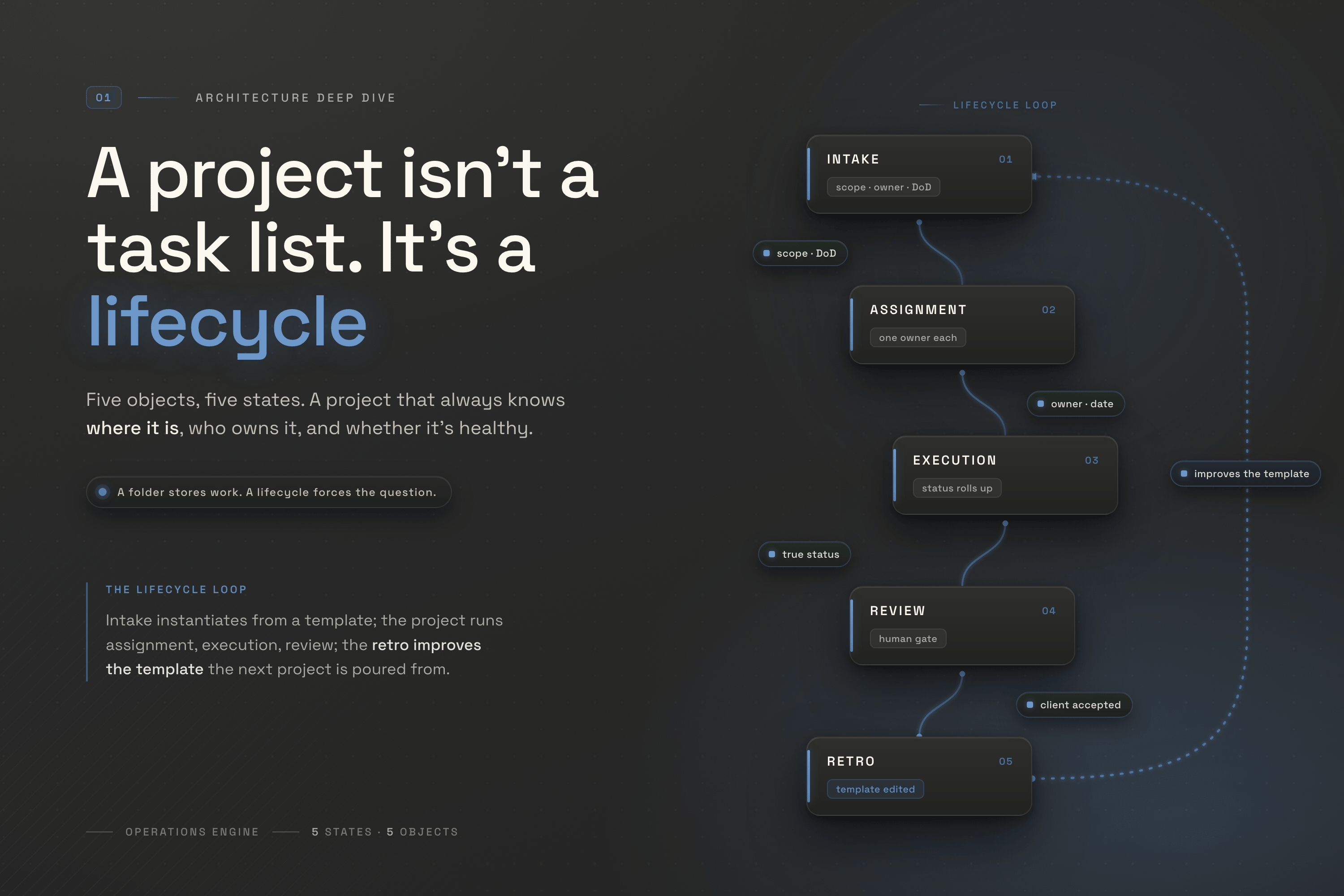
Intake: the project is poured, not built
Intake is where the project enters the model. The trigger isn’t a person deciding to start; it’s an event. A deal moves to Won in the CRM (Attio, in our case), and the project is instantiated from a standard template, never a blank list.
Instantiated, not built. That word is the difference between a project that’s shaped like every other one and a project that’s shaped like whoever happened to set it up. The template carries the milestone structure, the standard deliverables, the required fields, and the deliverable-versus-task split already in place. What gets added is the specifics: the scope inherited from the deal, the owner set by segment, the dates.
The operating rule at intake is a gate, not a step. The project cannot leave intake until three things exist as fields on the record: a locked scope, exactly one named owner, and a one-sentence definition of done. Not said out loud on a kickoff call. Written, on the project.
The failure mode when this gate is missing is the most common teardown I do on the operations side. The kickoff gets booked before the scope is locked, so the team leaves aligned on a vague goal. Work gets handed out before anyone is named. And six weeks later, the questions that should have been answered at the start show up as confusion, because what was never created at intake can’t be recovered later. It just arrives late, and more expensive.
What intake produces for the rest of the lifecycle is a project record that already knows what it is: scope, owner, definition of done, and a set of deliverables waiting to be assigned. If those aren’t on the record when intake closes, intake didn’t finish. Execution just started without it.
Assignment: one owner, or it didn’t happen
Assignment is the shortest state and the one most quietly skipped. Each deliverable gets exactly one owner and a due date. The project already has its single owner from intake; now the work underneath gets the same treatment, one level down.
The rule is absolute: no deliverable enters execution without exactly one named owner. “The team” is not an owner. It’s the word a project uses when it wants everyone to assume someone else has it. Co-ownership is what every stalled deliverable has in common: two people who each thought the other was driving, and a due date that slid because nobody felt the weight of it.
In the model, the owner is a required field on both the project and every deliverable. Required meaning the structure won’t let the item move forward empty, not “we really should remember to fill this in”. The moment a deliverable has an owner and a date, a clock exists: the system can now tell you when something is overdue without waiting for a human to notice.
What assignment produces is a project where every deliverable has a name and a date attached. If you can’t say, from the record alone, who’s accountable for each one and by when, you don’t have an assignment problem a meeting can fix. You have a model that never captured the answer.
Execution: where status has to be true
Execution is the long middle, and the only state that’s actually about doing the work. Tasks get built under their deliverables. The deliverable moves as its tasks move. And the one thing the architecture has to guarantee here is that the status of a deliverable is never a lie.
This is where the deliverable-versus-task split pays for itself. The client reads the top layer (the deliverables, named as outcomes), and the team works the bottom layer, the tasks. A missed QA task doesn’t spook the client, because the client was never looking at the QA task in the first place.
The rule that keeps it honest is the rollup: a deliverable’s status is derived from its tasks, not typed over them. If the tasks underneath a deliverable are blocked, the deliverable cannot show green. Automation does that watching: roll the status up from the work, flag any deliverable untouched past its expected cadence, surface a slipped date the moment it moves. In ClickUp these are native automations; the heavier cross-tool versions run on n8n. Either way, the machine watches so the oversight view is never a story someone told it.
The failure mode here is status theater: a project that looks on track in every report and is on fire underneath, because someone marked the deliverable green to dodge an awkward conversation. Typed status reflects how the owner feels; rolled-up status reflects what’s true. The architecture has to make the second one the default, because the first is what everyone does under deadline pressure.
What execution produces is a project whose surface tells the truth. The deliverable layer is the client update. Not a thing someone writes once a week by translating the task list into something presentable, but a live readout of where the work actually is.
Review: the gate at every milestone boundary
Review is the state most teams don’t have at all. Work flows from one phase into the next because the calendar moved, not because the previous phase was actually finished. M2 starts because it’s week three, not because M1’s deliverables were accepted.
In the model, the milestone boundary is a gate. A phase can’t close (and the next can’t open) until its deliverables have met their definition of done and the client has seen and accepted the deliverable layer. The review is where three things happen at once: the work is checked against the definition of done written back at intake, the client signs off on what they can see, and the next phase opens with its own deliverables ready to assign.
One rule inside this state matters more than the rest: closing a phase is a human decision, never an automated one. Automation can roll status up, flag staleness, and tell you a phase looks complete. It must never declare the phase done. Marking work finished is a judgment call about quality and client acceptance, and the moment you let a rule make that call, the gate stops being a gate. The machine watches; a person decides.
The review gate is also where you catch the project that quietly drifted off the model: the one that invented a status, skipped the deliverable layer, or started carrying scope nobody agreed to. A request that maps to no deliverable is, by structure, out of scope, and the gate is where that becomes visible instead of becoming next month’s surprise. You pull the project back into shape here, at the boundary, before the drift compounds.
What review produces is a clean handoff between phases, with the client’s acceptance recorded against the deliverables and the next phase ready to run. Skip it and phases bleed into each other until “done” is whenever the team runs out of obvious things to do.
Retro: the state that makes it an engine
Retro is what separates an operations engine from a process that merely runs. When a project closes (and at meaningful phase boundaries along the way), the team captures what the project taught: which estimates were wrong, where the template fought the work, what the client needed that the standard deliverables didn’t cover.
The trap is treating this as a feeling that gets shared and then forgotten. Modeled as an object, the retro has a job: its output is a change to the template that the next intake instantiates from. A deliverable that was missing every time gets added to the standard set. A phase that always overran gets re-scoped. A field that nobody filled gets cut or made required. The retro isn’t reflection for its own sake. It’s the edit that the next forty projects inherit.
That’s the loop that makes the whole thing an engine rather than a folder. Intake instantiates from a template; the project runs through assignment, execution, and review; the retro improves the template; the next project is poured into a slightly better mold than the last. The structure compounds instead of decaying, on purpose, because the feedback path is an object in the model, not a good intention.
The rule: a project isn’t done when the last deliverable ships. It’s done when the retro exists and any template changes are logged. Without that, you don’t lose the lessons dramatically. You lose them quietly, and you pay for them again on the next project that makes the same mistake nobody wrote down.
One model, read at four altitudes
Five objects, five states, and one payoff that makes the discipline worth it: because every project shares the same model, the same data reads at whatever altitude the reader needs (founder, delivery lead, contributor, client) without anyone building a second tracker. Four people, four questions, one set of data, and it holds only because the model doesn’t change shape from one project to the next. The portfolio-level mechanics of those views are their own subject; here the point is narrower: the views are free once the model is right, and impossible while it’s improvised.
This is the same lesson the revenue side teaches, one engine over. A pipeline isn’t a set of labels; it’s a set of operating rules. A project isn’t a folder; it’s a lifecycle with a model underneath. We wrote the revenue version of this argument as the case for designing the system before the stack, and the lead lifecycle version as the chain that runs from first touch to handoff. Operations is the third side of the same shape: design the model, then let the tool implement it.
How to test your own setup
You don’t need to rebuild anything to find out whether you have a lifecycle or a folder. Pick one active project and ask five questions of the record alone: no asking the team, no opening Slack.
- Who owns it, and who owns each deliverable? If the answer is “the team”, or if two names show up for one thing, assignment never really happened.
- What does “done” mean, in one sentence, written down? If “done” lives only in someone’s head, intake didn’t finish. It just stopped.
- Which phase is it in, and what gate did it clear to get there? If phases advanced because time passed, you have steps, not gates.
- Is the status true? Pull a deliverable that shows green and check the tasks underneath. If green is typed over a blocked task, your surface is theater.
- What did the last closed project change about the template? If the answer is “nothing, we don’t really do retros”, your engine doesn’t learn. It just runs.
These aren’t a dashboard. They’re a forensic test, and they tell you exactly where the model breaks: not whether the team is working hard, but whether the structure is holding the work or just storing it.
A folder of tasks tells you the team is busy. A lifecycle tells you where every project is, who’s accountable, whether the surface is true, and whether the engine is getting better at its own job. The work is the same either way. The difference is entirely in the model underneath, and the model is the part you can actually design.

Every other week I break down one operational system: what it does, where it leaks, and how to design the fix. No theory, no hype. Just the patterns that hold up in production.